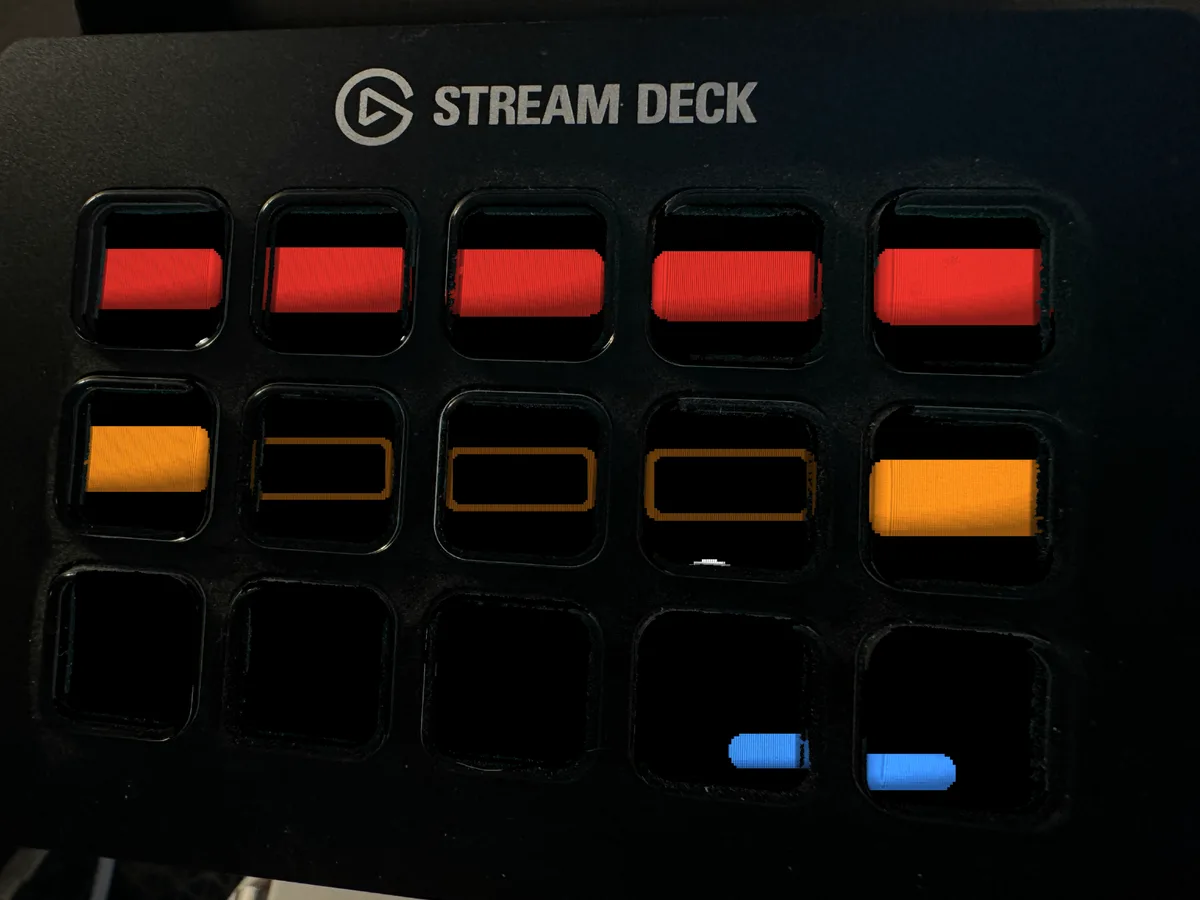
Brick Breaker
Brick Breaker is no longer sold on its own. It is included in the Arcade Pack, one download with every design in the set.
Your Stream Deck has been a wall of bricks this entire time and nobody ever told it.
Brick Breaker turns the key grid into the wall. One key is one brick. The ball works its way up through the colored rows in the old arcade scoring order, red over orange over green, and the paddle chases it along the bottom row while the wall thins out above. When a column finally gives way, the ball climbs the tunnel it made and starts eating the wall from the inside, which is the exact moment anyone who spent a childhood in front of a cabinet will recognize.
Here is what makes this animated Stream Deck screensaver different from every other one on the market. Everything else you can buy is a video: a loop somebody animated once and exported. This is a simulation. The ball has real physics, and where it strikes the paddle sets the angle it leaves at. The paddle puts english on the return, aimed at a brick still standing, so the rally keeps eating the wall instead of settling into one lazy column. And roughly one approach in seven, the paddle commits to the wrong key and runs the wrong way, because a paddle that never misses is not a game, it is a screensaver. It does miss. The ball drops past it, off the bottom, and the next serve comes off the middle key onto a wall that kept every bit of its damage. Clear the wall and it restocks brick by brick. Nothing here is keyframed. What you are watching is a recording of a run that genuinely happened.
What you get, immediately, on purchase:
Three animated GIF files, one per deck. Stream Deck MK.2 and the original 15 key Stream Deck at 480x272, Stream Deck XL at 1024x600, and Stream Deck Plus at 800x480. Use the one that matches your deck and ignore the rest.
A 90 second loop, 2250 frames at 25 frames per second, where the last frame is the first frame again, so there is no visible jump when it starts over. Most animated screensavers are a few seconds on repeat and you notice the seam inside a minute. You will not find the seam in this one.
An illustrated install guide as an HTML page, and the same guide as a plain text README for people who would rather read than click.
What that actually buys you: a desk nobody else has. Every Stream Deck on every desk on the internet goes dark or shows the same stock logo. Yours plays. On camera it is the thing chat asks about, and it answers the question "wait, is that actually playing" with a yes, because it is. Off camera it is the reason you look up from your keyboard at 2am and watch a ball chew through a wall for a minute instead of going to bed.
Installing it takes about a minute. Gear icon, Devices tab, "Set Screensaver", drop the file in, click Set Animation. The guide walks the whole thing with pictures, including the one mistake everybody makes, which is clicking "Set Image" and getting a still picture. There is no software to install, nothing to sign up for, and no subscription. Requires the free Elgato Stream Deck app, version 6.6 or newer. Stream Deck Mini and Neo are not covered.
This is made by one person who drew every pixel of it in code, and that same person reads the messages. If something looks wrong, send a message and you will get a real answer from someone who knows why.
Add it to your cart, download it, and have it running on your deck in the next five minutes. If you want more than one, look at the bundle listing before you check out. It is cheaper than buying two.