Falling Blocks
Falling Blocks is no longer sold on its own. It is included in the Arcade Pack, one download with every design in the set.
It is going to lose, and it has not worked that out yet.
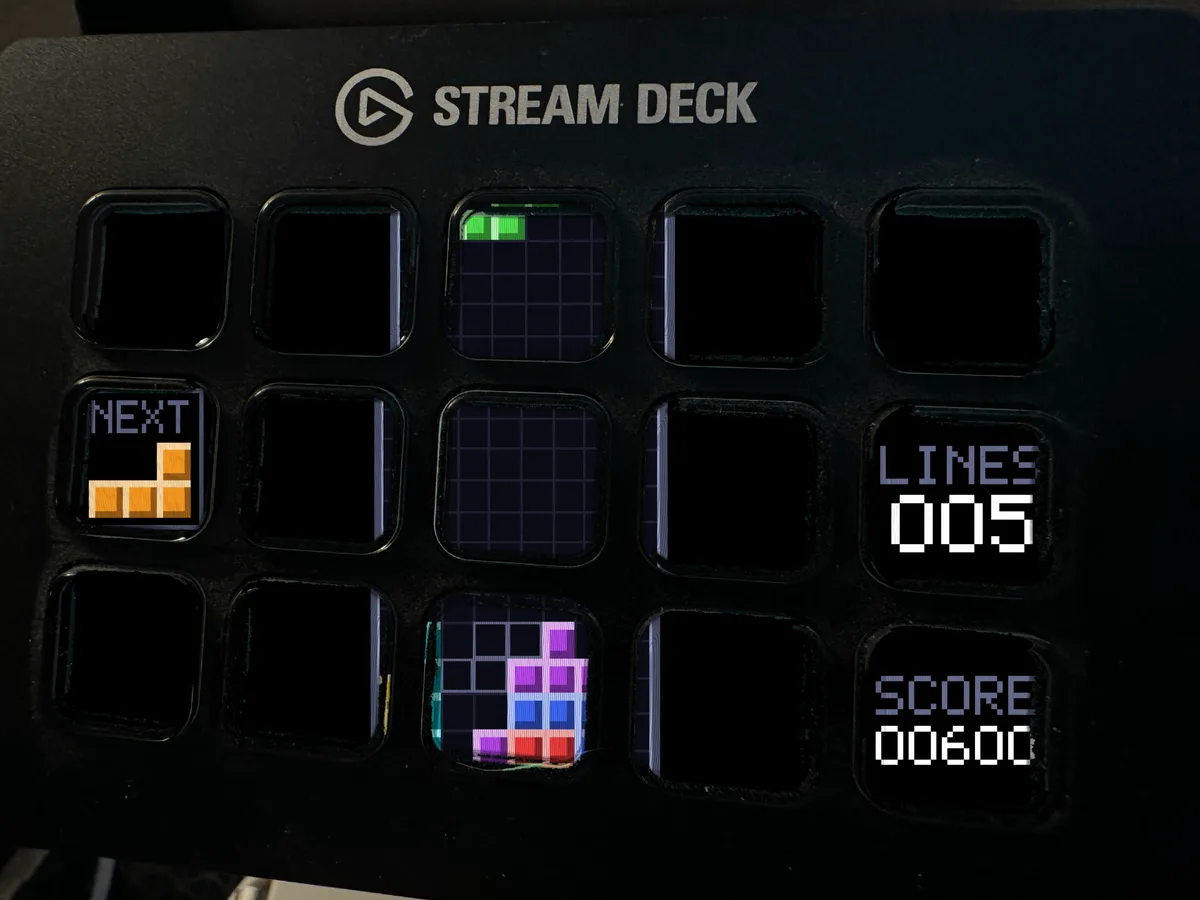
Falling Blocks is an animated screensaver for the Elgato Stream Deck, and it is the odd one out in this range. Every other design here puts one game cell on each key. This one ignores the key grid completely and draws a genuine ten wide, twenty deep well straight across the whole panel, with the NEXT box and the score sitting beside it, each tucked into a key of its own so the numbers stay readable. That matters more than it sounds. A well the size of the key grid would be five wide and three deep, which cannot physically hold a piece. This is a real well, and a piece lying flat is four cells wide, which means one key holds one whole tetromino.
Here is what separates it from every other animated Stream Deck screensaver on the market. The others are video loops: somebody animated a stack once, exported it, and it does the same thing forever because there was never a game underneath. This is a simulation. There is a player in there, choosing where each piece goes by weighing up the height of the stack, the lines it would complete, the holes it would bury and how uneven it would leave the surface. Early in the loop it plays well, sifting every rotation in every column and taking the best one. Then its judgment quietly decays. By the end it barely looks, grabs the better of two placements it happened to glance at, and starts digging the holes that eventually bury it. Nobody scripted that ending. It loses because it got sloppy, which is exactly how you used to lose, somewhere around the ninth minute.
So the whole ninety seconds is a game being played. Bevelled pieces slide in and rotate, the stack builds unevenly, and when a row finally completes it flashes white twice and collapses and everything above it settles down onto what is left. When the stack finally touches the ceiling the curtain comes down row by row, holds, lifts, and a fresh game starts. The loop is seamless: the last frame is the first frame again, pixel for pixel, so there is no jolt when it comes round.
The download holds three animations, one for each deck: Stream Deck MK.2 and the original 15 key at 480 x 272, Stream Deck XL at 1024 x 600, and Stream Deck Plus at 800 x 480. There is an illustrated install guide, and the same guide in plain text if you would rather just read it.
What you get is a desk that does not look like everybody else's. This is the one that works on people who claim not to care about retro gaming, because a falling block puzzle running on a physical grid of keys is just satisfying to watch. On camera it is a conversation starter that costs you nothing to run, since it only appears when you are not touching the deck anyway. And you will catch yourself doing the thing everybody does, which is quietly telling it where to put the next piece.
Installing takes about a minute. Gear icon, Devices tab, Set Screensaver, drop in the file for your deck, click Set Animation. Works on Stream Deck MK.2, the original 15 key Stream Deck, Stream Deck XL and Stream Deck Plus, with app version 6.6 or newer. The download is instant, so it is on your deck five minutes from now. Every animation in this pack was drawn from scratch in code by one person, with no traced artwork, no stock footage and no third party assets, and that same person answers the messages, so if anything looks wrong just ask.
Buy it, drop it in, and then try to look away while a row completes.